Friday, October 19, 2018

Blog Phase II

1.     Instructional Decisions/Teaching (InTask Standard # 9): Discuss the implementation process and describe
    • What went well and what didn't go well during the implementation of your lesson?
      • This lesson was engaging, but would have been more effective if we were allotted  more time. Unfortunately, we did not expect to teach our lesson on this day so we did not have our read aloud book. We improvised by playing it on YouTube. I suggestion was that we read only important portions of the book, as to save time. Kahoot was very successful and all students stayed on task. Prior to playing Kahoot, we should have taught a very short mini lesson, covering the information that was about to be reviewed; rather than just having students rely on their own found information.
    • How well was the alignment to objectives and standards maintained?
      • Alignment to objectives and standards were very well maintained, and everyone practiced reaching them. Students were to conduct research via internet, which helped students reach both the writing and technology standard.
    • Describe any modifications made during the implementation of the lesson
      • One necessary modification that was made involved the playing of Henry's Freedom Box on YouTube, rather than reading it personally. This was an impromptu decision, which was not as engaging as a normal read aloud but it got the job done.
      • Another modification involved the sharing of the rubric by means of email, rather than handing out a hard copy.

2.      Mechanics:
  • What technologies did I use (for the teacher and the learner)?
      • Technologies used included computers (for both students and teacher), white board, poster paper, and a projector.
  • How were the technologies used (by whom and in what manner)?
      • Computers were used to conduct research by both student and teach, prior to and during the lesson.
      • A projector was used to display the read aloud and Kahoot.
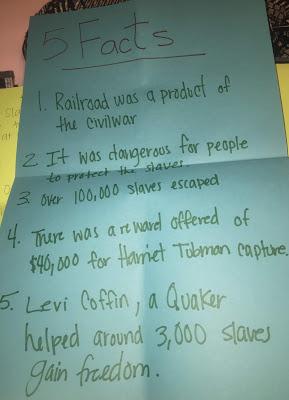
      • White board was used to display facts.
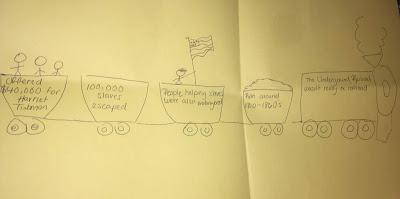
      • Poster paper was used as a creative outlet for presenting information.
  • My lesson was within the correct time frame
      • This lesson was within the correct time frame because my partner and I timed each section of the lesson, prior to teaching it. This gave us an idea of whether or not we had enough planned, or if we needed to add more. We were prepared for the time requirement.
3.      Assessment of Learning (InTask Standard # 6): Refer to Assessing Student Learning


      • Students were successful in achieving the standards. This is measurable by the posters they turned in, and their participation in Kahoot games. Students successfully completed their research, and produced a final project.
      • 60% of students received a 8/9, while the remainder scored 9/9 on the rubric. This shows that this lesson was effective and the standards were met.
    • Describe the level of success you had in teaching the lesson
      • This lesson was successful because student grades were high. This was an effective lesson that needed minimal adjustments.
    • How do your individual reflections support this?
      • Minor tweaks would involve having the book on hand, and reviewing new information in more detail.
    • How do the comments from your classmates support this?
      • Classmates suggested that we use a hard copy of the book, rather than an audio on YouTube. More than one also suggested reviewing the information in more detail.
4.      What did you learn from designing and teaching this lesson and how will you use this in the creation of future lessons/learning activities.
      • I learned the importance of timing your lessons, and being prepared if a resource is missing. There should always be a plan B, and we definitely had to utilize ours. I also learned first hand how beneficial technology integration can be, but it can also be hard to manage if you have a large amount of students or there is a technical difficulty. I will use this new found information when creating new lessons, by integrating technology and confirming that my lesson is within my allotted time slot. I will also be prepared by thinking of possible plan B's, or even C's.


Tuesday, October 2, 2018

Blog Phase I Reflection Questions


BLOG PHASE I REFLECTION QUESTIONS
Lesson Plan: I. Rationale & II. Overview Reflections: Assessing Prior Knowledge and Planning Instructions:


o What do the students need to know prior to the lesson?
     Students will need to know how to navigate a website, and find key information. In this case, the website will be Ducksters.com. The specific link will be provided to students, as to save time. It may be shared using Google classroom, or it may be shared via direct email.
They will be developing their research skills, and the skill of determining what information is important vs. what is not. Students will also need to be able to write down information found from said website. They will also need to know how to use and participate in Kahoot. They will be directed to the Kahoot website and will need to enter the given code in order to participate.

o How will prior knowledge and experience be assessed?
    Prior knowledge and experience will be assessed using a rubric; this rubric assesses the facts that they have written down, their presentation, and their participation. In order to annotate the online text, they will have had to know how to navigate the website. Their Kahoot knowledge will be assessed using the participation portion of the rubric.


o How will you use this information in the planning process?
    This lesson will be taught given the circumstances that the students have had time to use chromebooks/computers for similar activities, and are familiar with how to use them. If not, then more time should be spent teaching students how to use them. This could be done with a mini lesson, prior to conducting the writing lesson.

o When will the lesson be taught in the course of the school year? Why?
    This lesson should be taught in the second or third quarter of the year. Teaching this lesson at this time provides students the opportunity to become more tech savvy, and more easily reach technology standards. This will cut down on the time it takes to complete this lesson, because students will more promptly access the sites which means they will be conducting their research sooner.
    Waiting until this time also gives the teacher a chance to get to know her students, and he/she will have a better idea of which students should be paired together.

Lesson Plan: III. Implementation Reflection: Designing Instructions:

o How do the instructional methods align with what you know about best practices (think about your methods classes)?
    This lesson requires students to reflect, predict, conduct research, work in a team, and participate in Kahoot. By incorporating all of these activities, students will be actively engaged in order to complete their research assignment, presentation, and answer Kahoot questions. By allowing students to work in teams, they are further developing their ability to communicate with others and use each others strengths to better their assignment.


o How are you engaging students in creative and higher order thinking?
    Students are given the opportunity to present their research in whichever fashion they choose. This allows them to be creative and make illustrations that represent their new found facts. It is also a good skill for students to be able to read through a text, and annotate important information.

Lesson Plan: IV. Assessment Reflection: Planning Assessment:
o How does the assessment demonstrate that the students have been successful in learning the content?
    The assessment is a rubric which tests three aspect: Research, Presentation, Participation. By reviewing the rubric with students, it lets them know what is expected of them, and that they will be graded in those aspects.

o How does the assessment demonstrate that the individual student needs were met?
    The assessment will demonstrate individual students needs being met by referring to a rubric created to ensure that students are reaching the standard of research. Students are to conduct research, and write down at least 5 facts. If students have not done so, they will need to practice annotation skills in order to reach the standard.

Lesson Plan: V. Materials & Resources Reflection:
o How does your lesson meet Standard 1: Facilitate and Inspire Student Learning and Creativity?
    This lesson facilitates and inspires student learning and creativity by supplying them with materials as a means of presenting their newly learned information. They can be creative and coe up with different ways to present their information, by creating illustrations or diagraphs. They also get to participate in Kahoot.

o How does your lesson meet Standard 2: Provide Digital Age Learning Experiences and
Assessment?
    Students are learning through two different means of technology: Kahoot and Ducksters.com. Rather than listening to a lecture, they get to research for themselves and participate in a fun and competitive game. Both are forms of assessment, considering they are being graded on their annotation, and their participation in Kahoot.

o How does your lesson meet Standard 3: Model Digital Age Work & Learning?
    This lesson meets standard 3 because students are instructed where to find their information, and then are allowed to navigate the site independently.

o How does your lesson meet all four elements of Standard 4: Promote and Model Digital Age Citizenship and Responsibility by:
  1. advocating, modeling, and teaching safe, legal, and ethical use of digital information and technology, including respect for copyright, intellectual property, and the appropriate documentation of sources.
This lesson provides students with the link to the sites that they will be using, informing
students where the information derived from;
  1. addressing the diverse needs of all learners by using learner-centered strategies providing equitable access to appropriate digital tools and resources.
This lesson provides equitable access to technology by allowing students access to computers. All students were put in pairs to work in teams, and use each others strengths to their benefit.
  1. promoting and modeling digital etiquette and responsible social interactions related to the use of technology and information.
    Teacher will review social etiquette rules prior to students logging onto Kahoot, reminding them to use appropriate usernames.
  1. developing and modeling cultural understanding and global awareness by engaging with colleagues and students of other cultures using digital-age communication and collaboration tools.
    The presentation aspect of this lesson allows students to share their information with the class. Prior to these presentations, students are participating in a discussion about feeling left out because of being different which can relate to race, culture, socio economic status, etc. If you click HERE, you will be redirected to a completed copy of our lesson plan.

Monday, October 1, 2018

Linking Educational Technology Resource and GDC


1. In what learning environments would the technology resource I presented be appropriate?


My resource, Plickers, can be used in any setting. A parent can use this resource at home, given he/she has internet access and a computer, smart phone, or tablet. Plickers can be used in an elementary level classroom, as early as 1st grade. This resource might also be used in secondary or even college. It can be used to take surveys in college classes, or even a work setting. Plickers is a very versatile resource, that can be used in more than one way.

This technology can easily be associated with Socially Responsible Digital Use. It requires that the creators input appropriate and relevant information to be used. This means inputting information that is not offensive or biased. It also requires the creator to be responsible due to the need of printing out QR codes for all users, inputting information, and distributing codes. It can teach students/users responsibility because they need to follow along, pay attention, and hold up their codes when prompted. This would be a skill that needs to be taught more so in early education.

It is also a Safe, Ethical, and Legal Use of Technology, that can be beneficial to all involved.

2. In what learning environments would the technology resource I presented NOT be appropriate?

Plickers would not be appropriate in a Pre-K - Kindergarten classroom. Students are just beginning to learn letters and numbers at this time, so it might be difficult for them to follow along with a Plickers activity.

3. How might it be modified to be appropriate?

In order to make Plickers appropriate in a Pre-K -Kindergarten classroom, I would suggest limiting responses to A. and B, rather than A, B, C, and D. This gives students only two responses. Then questions that might normally be displayed on the board, could be read aloud, ie. "What color is on the board? If you think the color is red, hold up the letter A. If you think the color is green, hold up the letter B." This could also be used to make class decisions, as far as field trips, or special events might go. Again, limiting students options to answer A or B.

By using Plickers in this grade level, we would be contributing to Equitable Access of Technology. Regardless of age, we would still be exposing students to new technology and making it available for all of them to use.

4. What do you now know that needs to be considered when using technology in the classroom?

When using technology in any classroom, it is important to know your students prior knowledge with different resources. Before teaching a lesson that involves every student using a chrome book, determine whether all of your students know how to use one. And if not, dedicate some time to training them. Every student has a different culture and socio economic status, which might affect their technology knowledge.

It is important that students realize that technology has the power of connecting people from all around the globe, Global Awareness & Cultural Understanding. With this fact in mind, students should be made familiar with Global Digital Citizenship, and they should know what kind of online behavior is appropriate and what is not.


Wednesday, September 26, 2018

If you click here, you will be redirected to Anahi and Michelle's scenario regarding a student who abused technology by looking up and showing his peers inappropriate photos.
Image result for what would you do clip art

If I were Mark's teacher, I would immediately revoke his technology privileges and would contact his parents. I feel as if sex is an inappropriate topic to have one on one with a student, and should be had with the parent or guardian present to prevent any presumptions. I would explain to Mark that this is completely unacceptable, and that he will have to work very hard to earn his technology privileges back. As a second grader, Mark should know that this is not proper classroom behavior, and that it should never happen again.

Monday, September 24, 2018

Monday, September 10, 2018

Educational Resource: Plickers

If you click here, you will be directed to my Plickers Powerpoint.

Image result for thank you clip art

All information is taken from https://www.plickers.com/